Why Public Forms Ask the Same Question Twice
Why public forms ask the same question twice: learn to read repeated fields, spot their different purposes, and answer accurately without unnecessary confusion.
A public form may ask for your address near the top, then ask for it again beside a request about eligibility or delivery. That repetition can look careless, but standardized forms often reuse familiar questions to make information comparable while routing separate answers to different administrative tasks. Knowing how to read those fields helps you respond accurately without assuming they are duplicates.
Start by reading the form’s structure
Before filling anything in, scan the page or screen from beginning to end. Notice the form’s title, the agency named on it, section headings, instructions, and any explanation of what the information is used for. A repeated field makes more sense in context than it does in isolation.
Public forms commonly serve several purposes at once. One section may identify the person applying; another may determine whether a request fits a program; a later section may help the office contact the applicant or send a decision. Standardized questions let staff compare like with like, but each appearance can belong to a different part of the process.
Look for signals that sections have separate jobs: headings such as “Applicant information,” “Household members,” “Mailing details,” or “For office use,” and instructions that refer to a specific service. A repeated address under “Applicant information” and “Where should notices be sent?” is not necessarily asking for the same kind of address.
Compare the wording and surrounding instructions
Read every repeated prompt carefully, including its label and any nearby note. “Home address,” “current residence,” and “mailing address” may sound interchangeable in casual conversation, but an agency may need them to distinguish where someone lives from where correspondence should go. A checkbox or follow-up question can change the meaning as well.
Check whether the form asks about the same person, the same period, or the same kind of information each time. “Your name” and “authorized representative’s name” are different fields even if both request a name. Likewise, a date may refer to the date a person moved, the date a document was signed, or the date the request is submitted.
Instructions often explain why a repeated answer is needed. One copy may be used to match an application to an account, while another may be passed to a program team or included in a notice. Think of the fields like labels on separate folders: the same identifying detail may need to accompany each folder so it reaches the right desk.
Decide whether the fields are truly duplicates
Before entering the same answer twice, compare the full prompts rather than matching a single word. Ask yourself:
- Do both fields refer to the same person or organization?
- Do they request the same kind of detail, such as a residence rather than a delivery address?
- Do they apply to the same time period or event?
- Does either field have a separate instruction or a clear link to a section?
- Does the form explain what the answer will be used for?
If the prompts ask for the same fact in the same way, repeating your answer may be exactly what the form expects. If they differ, answer each according to its own wording. Don’t force two distinct fields to match just because the form repeats a familiar label.
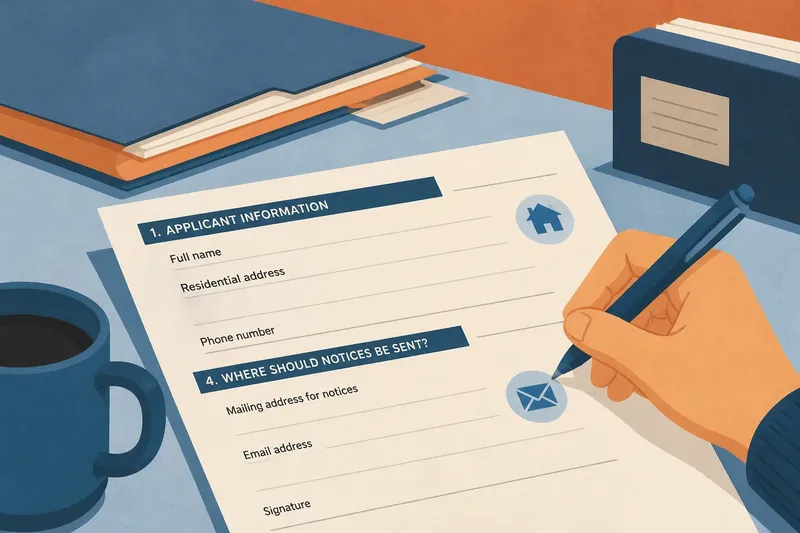
Say you are completing a library program application that asks for “residential address” in the applicant section and “mailing address for notices” near the signature. Imagine you live at one address but receive mail at a post office box. The useful response is to provide the residence in the first field and the post office box in the second, rather than copying one answer into both.
Handle unclear or inapplicable fields carefully
If two prompts appear identical but sit in separate sections, first check the form’s instructions, help text, or accompanying document. The repetition may be intentional, and leaving a field blank could make the application incomplete. If the purpose still isn’t clear, contact the office using the details provided and ask what that particular field refers to.
When a question does not apply, use the form’s stated option, such as “not applicable,” if one is provided. Don’t invent an answer or leave a required field empty without checking whether the office expects a particular response. If the form allows a note, a short explanation can clarify why an answer differs from the one elsewhere.
For an online form, check whether a response entered in one section appears automatically in another. A prefilled answer may save typing, but review it in its new context; the system may have copied a value that needs correction. For a paper form, write legibly and keep any distinction clear, especially between a physical address and a place where mail can be received.
What should you do when repeated fields conflict?
Should you copy the first answer into the second field?
Only if both prompts request the same information for the same person and purpose. If one asks for a different address, date, or role, answer that field independently.
Can you leave a repeated question blank?
Check whether the field is marked optional and read the instructions for that section. If it is required or unclear, ask the issuing office rather than guessing.
What if the form’s wording is too vague?
Use the form’s contact information to ask what the field means and, if useful, identify its section heading. A concise question about the field’s intended use can help you provide the right kind of information.
Why might an office request the same detail again?
A repeated field can support a separate step, such as identifying an applicant in one section and directing correspondence in another. The layout may reflect how information is handled across distinct parts of the process.
Review the completed form as a set of connected answers
Once you have filled it in, review each repeated item alongside its heading and surrounding questions. Check that names, dates, and addresses are consistent where they should be, and intentionally different where the prompts ask for different facts. Confirm that every required field is answered and that you have not mistaken a mailing detail for a residence or a representative for an applicant.
Keep a copy of what you submit if the form or process allows it. That record can help you answer follow-up questions and see exactly which version of a detail the office received. When you understand why public forms ask the same question twice, repetition becomes a cue to read the neighboring instructions—not a reason to copy blindly.